The usual flow is easy to understand: open Windscribe, choose a country or city when needed, and connect. The official iPhone and Mac guides describe the same basic approach.
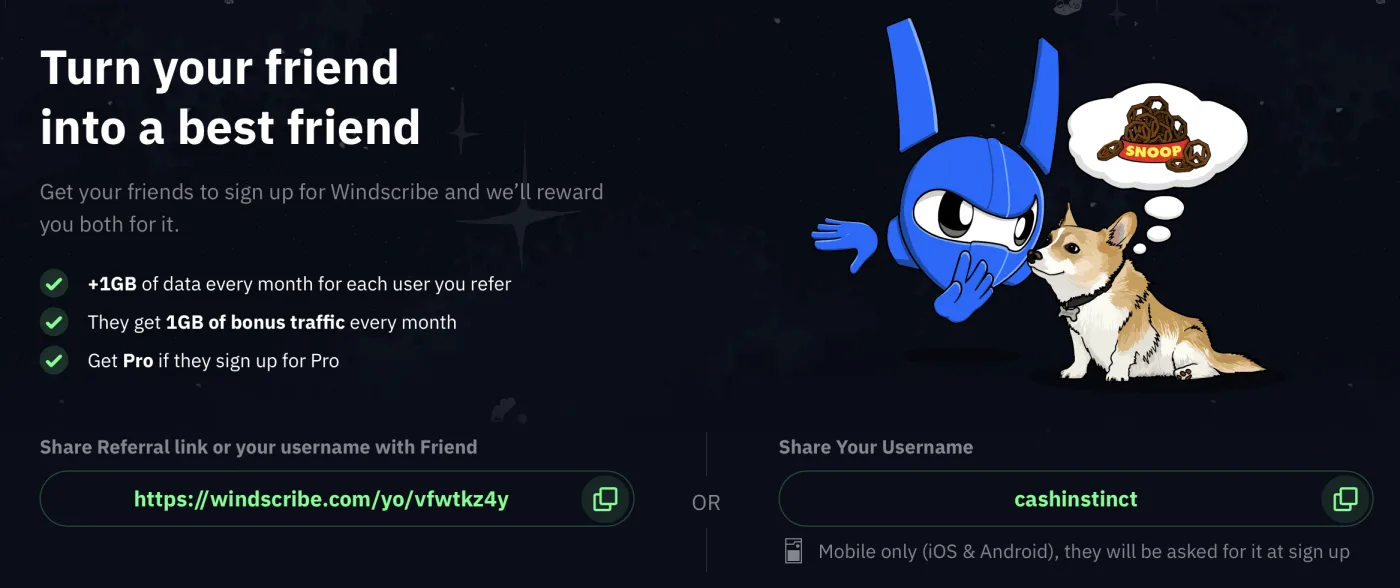
Quick answer: use the Windscribe referral link for a website sign-up, or enter cashinstinct as the referral username in the iOS/Android app. After the new account is created and its email is confirmed, both people get +1 GB/month. If the referred user later buys an eligible monthly or annual Pro plan, the referrer gets the same Pro plan free; Build-A-Plan is excluded. The referred user does not get Pro free or a Pro discount.
What does the Windscribe referral offer include?
Windscribe’s official Refer a Friend page describes two rewards that can follow the same eligible referral. The first is data for both accounts after account creation and email confirmation. The second is a Pro reward for the referrer if the referred user pays for an eligible Pro plan.
For context: Windscribe’s official homepage advertises 10 GB of data every month with a free account once the email is confirmed. The referral bonus is added to that monthly allowance.
New user+1 GB of data every month after creating the account and confirming the email, on top of the free plan’s 10 GB/month.
Referrer+1 GB of data every month for each referred user after that user confirms email.
Referrer Pro rewardThe same monthly or annual Pro plan free if the referred user buys it. Build-A-Plan is excluded.
Important: this referral is not a coupon for the new user. Windscribe’s linking instructions say the price does not change. The documented new-user benefit is +1 GB/month; the Pro reward is for the referrer when the referred user buys an eligible monthly or annual Pro plan.
Referral link vs username: which should you use?
There is one referral program and one Cash Instinct identifier. The method depends on where you create the Windscribe account:
Web browser → referral linkOpen this Windscribe link ↗, then create the account on the Windscribe website in the same browser. The link sets a referral cookie for web attribution.
iOS/Android app → usernameWhen the Windscribe app asks for a referral username, enter
cashinstinct. This is the official mobile method described for iOS and Android app sign-ups.Do not mix the paths: the web link is attributed through a browser cookie, so Windscribe says the account must be created on the website for that method. For an app sign-up, use the username prompt instead. This does not mean the mobile app cannot support referrals.
How to use the Windscribe referral link
Open the link in your sign-up browser
Open the Windscribe referral link ↗ in the browser where you plan to create the account. Opening the URL sets a referral cookie with the referral ID.
Create the account on the Windscribe website
Complete registration on the website in the same browser. Windscribe’s official instructions distinguish this web flow from an app sign-up because the app does not use the browser cookie.
Confirm your email
Confirm the email address linked to the new Windscribe account. This email confirmation is an explicit condition for the +1 GB/month reward.
Check the referral benefit
The new account and the referrer can receive +1 GB/month. If the new user later buys an eligible monthly or annual Pro plan, the referrer receives the same Pro plan free; Build-A-Plan does not qualify for that Pro reward.
How to use cashinstinct on iOS or Android
Install or open the official Windscribe app and follow its account-opening flow. When the app asks for a referral username, enter cashinstinct exactly, then finish registration and confirm the email address.
Windscribe’s official Refer a Friend page specifically says that sharing a username works for iOS and Android app sign-ups. You do not need to force the web link into the app: the username is the mobile attribution method for this same referral.
Quick mobile check: if the referral username field is not shown, do not invent a different code or assume a discount. Finish only if the official flow is right for you, and check the current Windscribe account screens or support instructions.

How does the Windscribe Pro reward work?
The Pro reward is not a free Pro trial for the new user. It works on the referrer side: if the referred user pays for Windscribe Pro for one month or one year, Windscribe says the referrer receives that same Pro plan free.
- Monthly Pro purchase by the referred user → same monthly Pro plan for the referrer.
- Annual Pro purchase by the referred user → same annual Pro plan for the referrer.
- Build-A-Plan → excluded from the documented Pro reward.
The official program describes the rewards as dependent on the referred account’s actions. Conditions and program availability can change, so check Windscribe’s current terms before relying on a future Pro reward.
Important conditions to keep in mind
- You must confirm your email address to receive the extra 1 GB/month.
- The browser-cookie method requires the account to be created on Windscribe’s website, not in the app.
- For iOS/Android app sign-ups, use the referral username prompt with
cashinstinct. - The link or username does not give the referred user a Pro discount. Windscribe says referral linking does not change the price.
- The official policy applies to plans purchased directly through Windscribe’s website and excludes reseller purchases; Build-A-Plan is excluded from the Pro reward.
- Program terms can change; check Windscribe’s current terms before signing up or making a purchase.
My experience with Windscribe
I’ve had a Windscribe account since November 2017. What I appreciate most about the service is how straightforward it feels: on an iPhone or Mac, I can open the app, choose a location and connect without having to configure a long list of technical settings.
A practical use is checking how a Canadian site or service behaves when the connection appears to come from another region or province. That changes the IP address a service sees, not every location signal about the user.
For services such as Netflix or Disney+, a location in Canada, the U.S., France or Germany can be useful for comparing what is offered by country when that location is available on your account. I see this as something to try, not as guaranteed access.
Windscribe presents Netflix and Disney+ among its streaming use cases. Access to a specific catalogue is not guaranteed: platforms can detect VPN connections and change their rules or catalogues.
My short take: Windscribe is appealing here because the basic app experience is simple and the location choice is easy to understand. The useful expectation is “try another IP location and see what works,” not “every regional restriction will disappear.”
Windscribe referral code FAQ
What is the Windscribe referral code?
For this referral, the username is cashinstinct. Use the Windscribe referral link for a web sign-up, or enter cashinstinct when Windscribe asks for a referral username during an iOS or Android app sign-up. These are two attribution methods for the same referral program.
How do I use the Windscribe referral link on the web?
Open the referral link in the browser where you will create the account, then complete sign-up on the Windscribe website in that same browser. Opening the link sets a referral cookie; the official instructions say the account must be created on the website, not in the app, for this cookie-based attribution. Confirm your email afterward.
Can I use cashinstinct in the Windscribe mobile app?
Yes. For an iOS or Android app sign-up, enter the referral username cashinstinct when Windscribe asks for it. The username is the mobile method; the web referral link is the browser method. The app can support the referral through the username prompt.
What does the referred Windscribe user get?
After the referred user creates an account and confirms their email, Windscribe says both the referred user and the referrer get +1GB of data every month. The referred user does not get Pro free, a Pro discount or a special Pro rebate from this referral.
What does the Windscribe referrer get?
After the referred user creates an account and confirms their email, the referrer gets +1GB of data every month for that referral. If the referred user pays for an eligible monthly or annual Pro plan, the referrer gets the same Pro plan free. Build-A-Plan is excluded.
Does the Windscribe referral link give the new user a Pro discount?
No. Windscribe’s official account-linking instructions say the referral does not change the price. The documented immediate benefit for the referred user is +1GB/month after email confirmation; the Pro reward is for the referrer if the referred user buys an eligible monthly or annual Pro plan.
Can I post a Windscribe referral link on a website?
Yes. Windscribe’s official linking instructions say a unique referral URL may be posted on a website. For attribution, the person should open that URL and create the account on the Windscribe website in the same browser, then confirm their email.
Official Windscribe sources
- Windscribe Refer a Friend ↗: +1 GB/month for both people after email confirmation, plus the referrer-side Pro reward.
- Referral and affiliate account linking instructions ↗: browser cookie, website sign-up, username/app distinction, prices and Build-A-Plan exclusion.
- Does Windscribe have a referral or affiliate program? ↗: current individual referral-program overview.
- How to set up Windscribe on an iPhone ↗: official app connection and location-selection flow.
- How to set up Windscribe on a Mac ↗: official macOS connection and country/city selection flow.
- Why online location may differ from the VPN server location ↗: IP location versus device/browser location caveats.
- Windscribe and Netflix streaming ↗: Windscribe’s own streaming positioning, not a Cash Instinct guarantee.
- Windscribe and Disney+ streaming ↗: Windscribe’s own streaming positioning, not a Cash Instinct guarantee.
- Windscribe homepage ↗: 10 GB of data per month with a free account once the email is confirmed.
- Windscribe pricing and checkout ↗: annual reference price and billing presentation.
- Windscribe automatic renewal policy ↗: general subscription-renewal rules.
Lire cette page en français : code de parrainage Windscribe
Use the Windscribe referral method that matches your device
For a web sign-up, open the referral link. For an iOS/Android app sign-up, use the username cashinstinct when prompted.
cashinstinct
Open web link ↗