EBOX vs Bell vs Videotron
Compare the major providers across the factors that matter to your household:
- pricing
- promotions
- speed
- service terms
- equipment
- support
Enter referral code GE911 during sign-up to receive a $25 credit on your second bill for eligible new residential customers in Quebec and Ontario.
GE911
Transparency: GE911 is my personal EBOX client code. For an eligible sign-up, EBOX also gives me $25 after installation, at no additional cost to you.
Step 1 — Copy the EBOX referral code
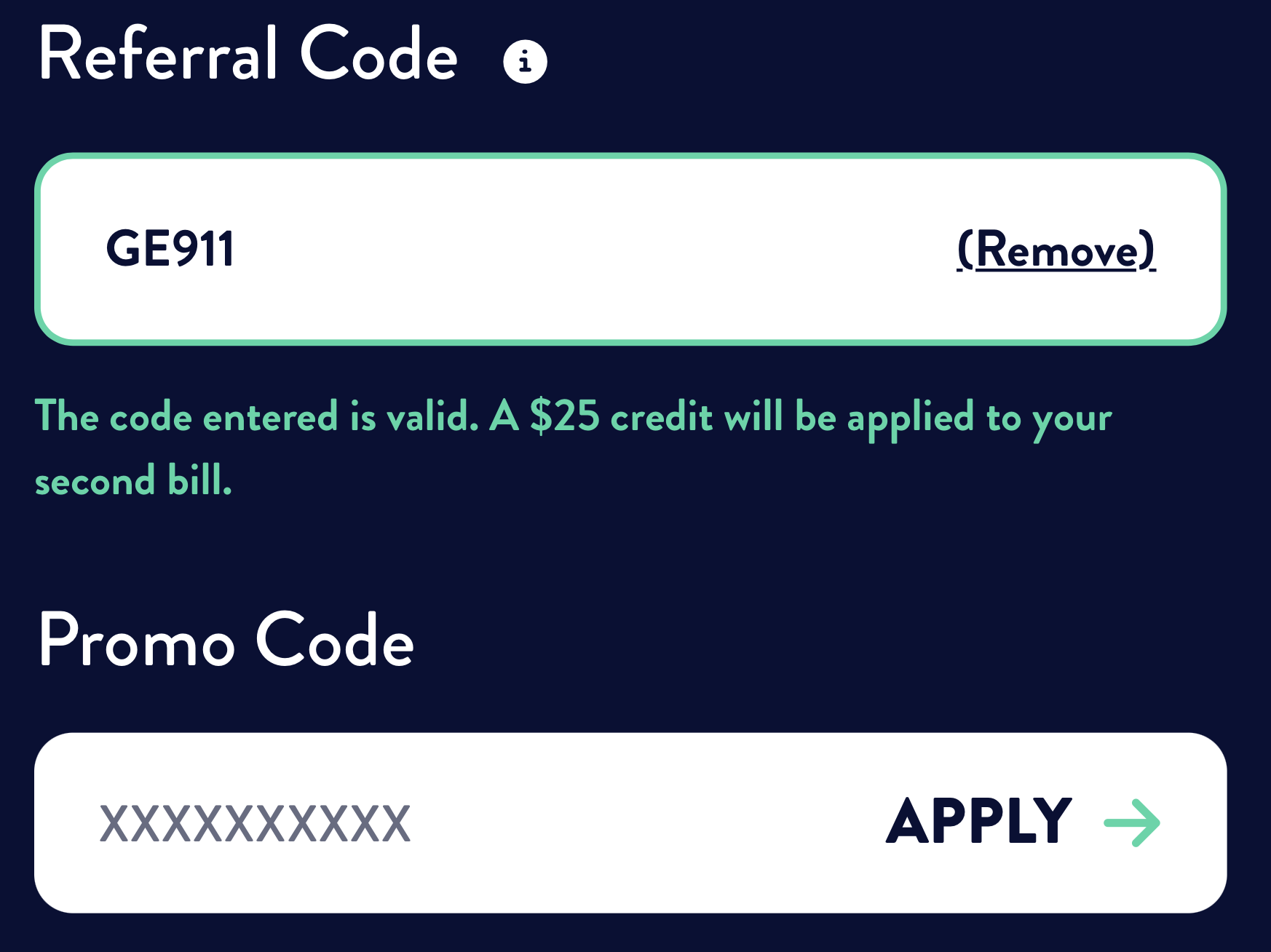
GE911 is the referral code to use in the current checkout. Paste it under “Referral Code” and apply it — never under “Promo Code”. It corresponds to my personal EBOX client code.
Check the form confirmation before continuing.
Then choose the English sign-up path for your province: the Quebec and Ontario links are at the top and bottom of this page.
Step 2 — Apply it under “Referral Code”
Enter GE911 in the “Referral Code” field, then select “APPLY”. Do not use the separate “Promo Code” field. Once the code is accepted, EBOX displays a confirmation that the $25 credit will be applied to the second bill.

GE911 is the referral code to use in the current checkout; it corresponds to my personal EBOX client code. For an eligible sign-up, you receive $25 on your second bill and EBOX gives me $25 after installation, at no additional cost to you.
GE911, contact EBOX as soon as possible.
Go to the EBOX website and select the plan that suits you. EBOX offers residential Internet plans based on your address and available technology. No fixed-term contract; amounts due and charges provided for under EBOX's terms may still apply.
In the order form, enter GE911 under “Referral Code” and apply it. The adjacent “Promo Code” field is for temporary EBOX promotions and should not contain GE911.
After applying GE911, confirm that the code is accepted and that the $25 credit for your second bill is displayed before completing your order.
Complete your order. The $25 credit will be applied automatically to your second bill.
The most common issue is entering the code in the wrong field. The EBOX form has two separate fields, each with a different purpose.
| Cause | Solution |
|---|---|
| Code entered under “Promo Code” | Use “Referral Code”, then apply GE911 |
| Code added after account creation | Enter the code when placing the initial order |
| Address or account already linked to an EBOX subscription | Offer is for new customers only |
| Typo in the code | Copy GE911 exactly, with no spaces and in uppercase |
Referral code GE911 is intended for new residential customers signing up for EBOX Internet in Quebec or Ontario. The referral code cannot be used for subscriptions linked to the same address or account.
🔄 Former EBOX customers: under EBOX’s current official FAQ, a former customer can qualify if the account was closed more than one year ago and a new account is created instead of reactivating the old one. EBOX determines final eligibility.
Many people compare EBOX with Bell because both services often use Bell’s fibre network where available. EBOX is a Bell Canada brand, even though its prices, equipment, billing and customer service remain distinct from Bell’s. To understand why access technology can change upload performance, see our guide to the differences between FTTH, HFC and FTTN.
| Provider | 500 Mbps offer shown on October 20* | Term and key condition | Network |
|---|---|---|---|
| EBOX — code GE911 | $59/month (500/500) | No fixed term | Bell FTTH where available |
| Bell | $75/month (Fibe 500, credit included) | Temporary $5/month credit for 2 years with autopay; displayed rate is for a 2-year term. Limited-time offer and address eligibility; month-to-month option has a different rate. | Bell FTTH where available |
| Videotron | $75/month (500/50) | No fixed term advertised; monthly discount conditional on keeping an eligible Helix service of at least $81/month; signup offer is limited-time. | Coax (HFC); 100% fibre in select areas |
*Quebec pages checked October 20, 2026; prices are CAD/month before tax and availability depends on address; prices were not necessarily returned for the same address. EBOX’s $59 price already includes the $5.95/month equipment rental listed in its general terms; do not add it again. Bell’s price includes the temporary $5/month autopay credit for 2 years; the displayed price without that credit is $80/month. The displayed rate is for a 2-year term; a month-to-month option has a different rate. The offer is limited-time and address-eligible, and Bell says prices may increase during a subscription. Videotron’s price includes a $6 monthly discount advertised as “lifetime” only while an eligible Helix service of at least $81/month is maintained; its signup offer is limited-time. Check the terms returned for your address. Sources: EBOX, Bell and Videotron.
For detailed pricing, equipment, promotions and province-specific plans, see the complete EBOX vs Bell vs Videotron comparison. Moving? See the Quebec moving Internet guide.
Use the comparison that best matches the providers on your shortlist.
Compare the major providers across the factors that matter to your household:
Compare lower-cost providers according to your connection needs:
Since switching to EBOX's Fibre 500 Mbps plan in the Montreal area, I've had a very positive experience. My Speedtest results consistently show download speeds of 480–510 Mbps and upload speeds of 490–510 Mbps. I haven't encountered any billing errors, and my uptime monitoring recorded fewer than three noticeable disconnections over six months.
What I appreciate most:
To place this experience in context, see the EBOX vs Bell vs Videotron comparison.
Comparing home Internet providers? See the Fizz Internet guide as well.
These definitions clarify the labels customers encounter during sign-up and billing.
The EBOX referral code featured on this page is GE911. It provides a $25 credit on the second bill for eligible new residential customers.
Active code · verified October 23, 2026. Eligible new customers receive a $25 credit on their second bill; the referrer receives $25 after installation. Eligibility remains subject to EBOX's current terms.
The most common cause is entering GE911 under “Promo Code” instead of “Referral Code”. Enter GE911 under “Referral Code” and apply it.
If the “Referral Code” field is missing, restart the order directly from ebox.ca or contact EBOX at 1-844-323-EBOX (3269) before completing the order to ask whether the code can be added.
EBOX may periodically offer promotions separate from its referral program. Check EBOX's current offers and terms when signing up. GE911 remains the referral code featured on this page and provides a $25 credit on the second bill for eligible new customers.
GE911 provides a $25 referral credit on the second bill for eligible new EBOX residential customers in Quebec and Ontario.
Enter GE911 under “Referral Code” and apply it — not under the separate “Promo Code” field.
EBOX states that its residential Internet service has no fixed-term contract. Review the current service terms for your province and selected plan before ordering.
Officially, the referral code should be entered during checkout. Some customers report that EBOX has helped them after the order when they contacted customer service before installation, but this is handled case by case and is not guaranteed.
GE911 is intended for eligible new residential customers in both Quebec and Ontario. Choose the English order path for your province because availability and plan terms are determined by the service address.
No. GE911 is the EBOX referral code presented here and belongs under “Referral Code”. It corresponds to my personal EBOX client code; promotional codes belong under the separate “Promo Code” field.
| Feature | Referral Code (GE911) | Promo Code |
|---|---|---|
| Offer type | Referral program under current conditions | Temporary marketing campaign |
| Benefit | $25 credit on bill | Targeted discounts (installation, etc.) |
| Where to enter it? | “Referral Code” field | “Promo Code” field |
Enter GE911 under “Referral Code” and check the on-screen confirmation before continuing.
Under EBOX’s current official FAQ, a former customer can qualify if the account was closed more than one year ago and a new account is created instead of reactivating the old one. EBOX determines final eligibility.
Your EBOX customer code appears on your invoice, next to the contract number. It usually consists of a few letters followed by numbers.
💡 You can also find it in the emails EBOX sent when you opened your account. Check the account activation link—the c= parameter in the client.ebox.ca/validate URL—and the filename of the contract summary PDF attached to the "Contract Summary" email (format: ebox_contract_yourcode_contractnumber.pdf).
If you no longer have those emails, contact EBOX at 1-844-323-EBOX (3269) or use live chat to request the code.
💡 Once you have your referral code, you can share it with new subscribers through the same referral program as GE911.
EBOX may perform a credit check during some sign-ups. In my case in Quebec, it appeared as a soft inquiry, with no hard inquiry visible in my credit file. Most recent customer experiences I found also report a soft inquiry, although at least one customer reported a hard inquiry. EBOX does not officially specify the type of inquiry in its terms. For more context on soft versus hard inquiries and how to follow your Equifax score and report, see our Borrowell guide to credit scores and reports.
EBOX bills its monthly services in advance. Depending on the order, activation and billing dates, the initial payment or first bill may therefore differ from a normal monthly bill. The $25 referral credit is not applied to the first bill; it is normally applied to the eligible new customer's second bill.
Yes. EBOX is a Bell Canada brand. Where fibre is available, EBOX often uses Bell’s fibre network, but its prices, equipment, billing and customer service remain distinct from Bell’s. To compare the two offers, see EBOX vs Bell vs Videotron.
Choose the English sign-up path for your province, then enter GE911 under “Referral Code” and apply it during checkout.
GE911, you receive $25 on your second bill and EBOX gives me $25 after installation. Always verify current terms directly on the EBOX website. To learn more about how the guides are prepared, see About Cash Instinct.